
MFA Element
What is the MFA Element?
The MFA Element enables users to set up MFA with a valid phone number, and to complete the MFA challenge when BILL requires an MFA-trusted user session for an operation.
Element features
The MFA Element enables a set of user interactions and features.
| Feature | Description |
|---|---|
| Add a valid phone number to set up MFA | Adding a phone number is the first step in the BILL MFA setup. This is where BILL sends you an MFA challenge. |
| Select your preferred method to validate MFA challenge | You can receive the MFA challenge by text message or voice call. |
| Receive & enter MFA challenge | Enter the MFA challenge to complete validation. At successful validation, the user session is MFA-trusted. |
| Remember the device for 180 days | If this feature is enabled, BILL maintains MFA for the user's device for 180 days. |
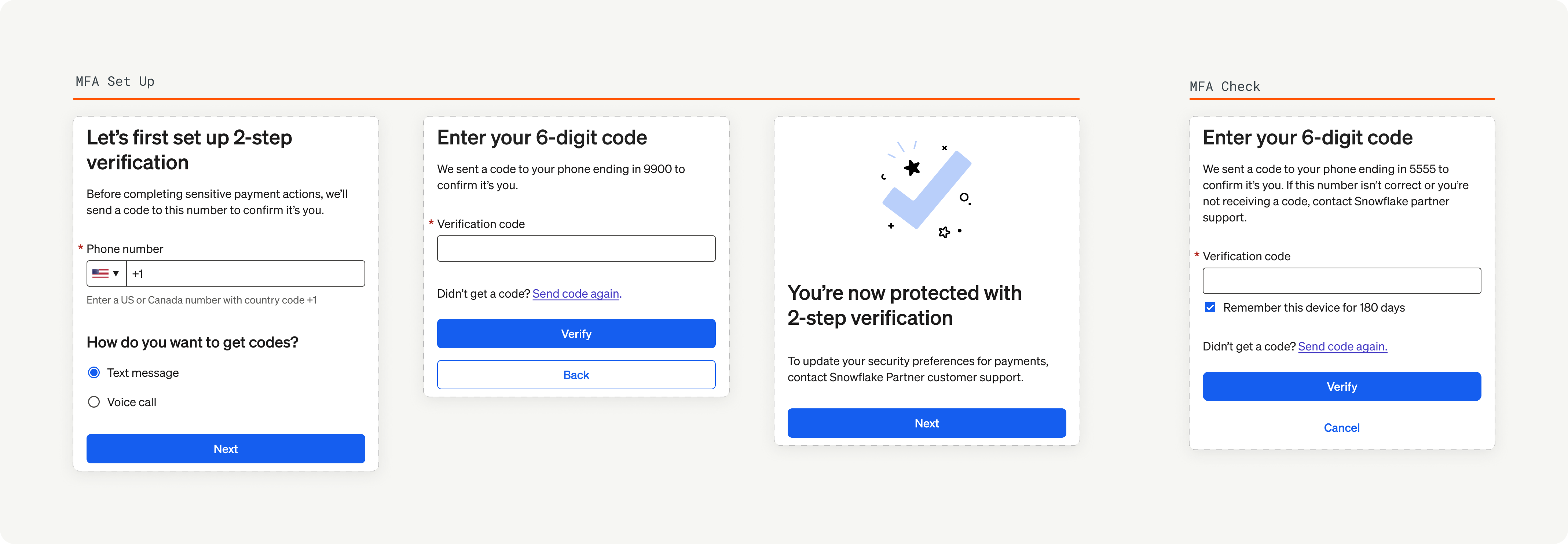
MFA Element overview
In the next set of sections, we showcase the user experience and implementation details for the MFA Element.
Updated 8 months ago
Did this page help you?