
AP payment funding methods
BILL supports multiple AP payment funding methods: US-based bank account, credit card, and debit card.
Bank account
A US-based bank account is a BILL funding payment method. There is no limit to the number of bank accounts you can add.
You can add an organization bank with the Create a bank account API endpoint or Add funding Element (automatically with Plaid or manually).
NOTE: Only the user who added the account can complete verification.
Add bank account details
Add a bank account automatically with Plaid or manually.
BILL sends a test ACH deposit to the manually entered bank account
Verification requires a real micro-deposit to confirm bank account ownership. BILL sends a test ACH deposit, which can take up to 2 business days. The transaction description in your bank statement shows your company name and BILL.
Verify the manually entered bank account
Enter the exact amount to verify the bank account with the Manage funding Element or the Verify bank account API endpoint. You have 14 days to verify the bank account before the bank account expires.
NOTE: The user that manually added a bank account must be the one to complete verification.
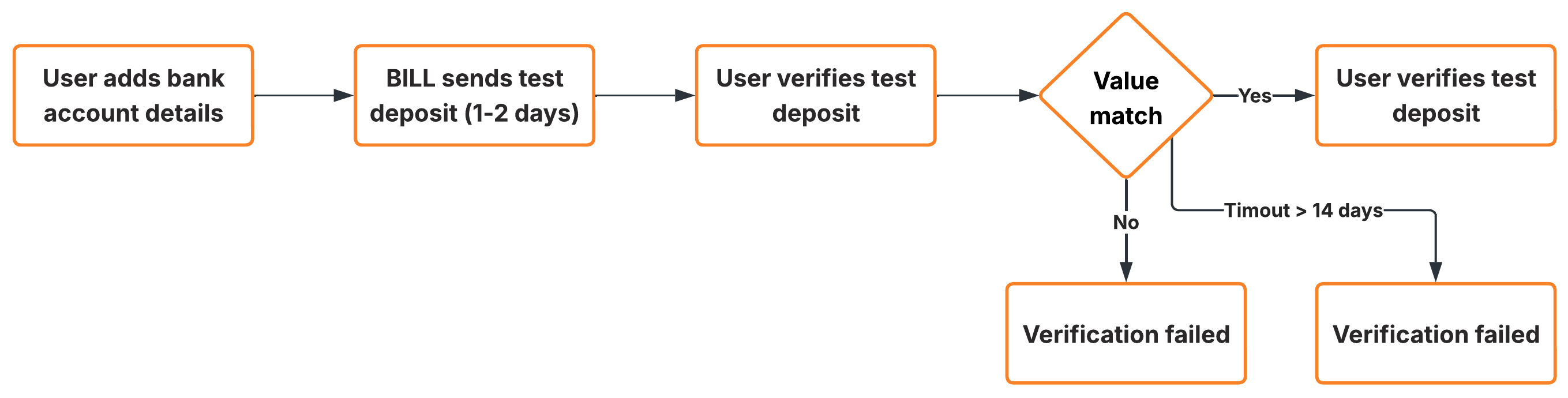
Manually entered bank account verification workflow
Important notes about bank accounts
| Note | Description |
|---|---|
| Invalid bank account details | If BILL cannot verify any details about a manually entered bank account (such as an invalid routing number), the bank account is invalidated. |
| Default bank account | The first verified bank account becomes the default payables account. You can update the default payables account with the BILL Web app. |
| Debit block | If your bank has a debit block, use BILL ACH IDs to authorize BILL to withdraw funds. See How to prevent or address debit blocks & failed fundings (R29) with BILL ACH IDs in the BILL Help Center for more information. |
Pay by card
Credit card and debit cards are BILL funding payment method. You can fund vendor payments with a credit card or debit card even if the vendor does not accept card payments.
BILL processes a card payment with your card provider and then disburses the vendor via check, ACH, or virtual card.
BILL does not set any additional temporary authorizations.When you pay by card, BILL authorizes only the payment & transaction fees. BILL does not set any authorization more than the payment amount.
Pay by card benefits
You can defer card account payments until your credit card bill is due.
Earn card rewards offered by your card provider.
Important notes about pay by card
| Note | Description |
|---|---|
| Transaction fees | You pay an industry-standard transaction fee for each transaction (usually ~2.9%). |
| Compliance | A set of card providers do not allow payments in specific vendor industries. For these providers and industries, you are required to set vendor industry information before you can submit a payment. |
Updated 3 months ago