
Elements reference
In the next set of sections, we showcase the user experience and implementation details for working with each BILL Element.
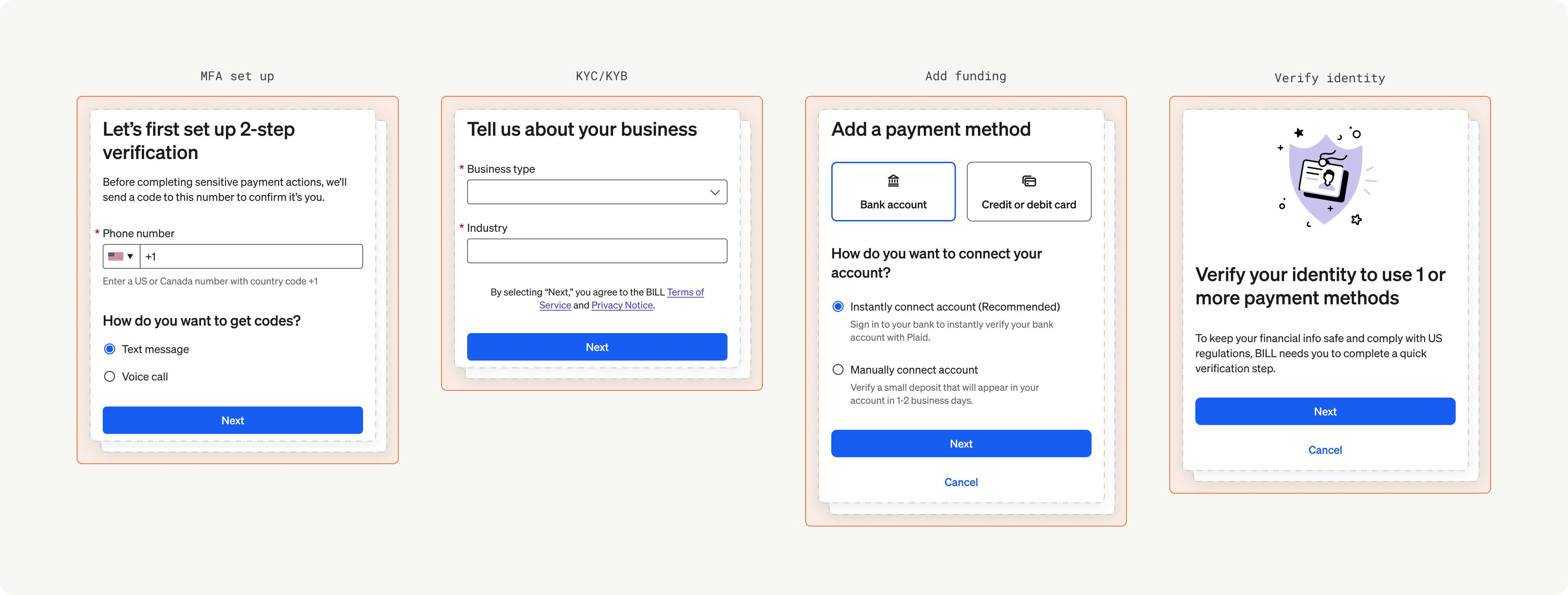
Onboarding Element
Working with BILL Elements requires an understanding of the use of the BILL v3 API. See the API reference to learn about the list of available BILL v3 API endpoints.
| BILL Element | Description |
|---|---|
onboarding | Onboarding Element to complete BILL KYC/KYB checks for the organization, set up MFA, add funding payment methods for paying vendors and bills, and complete user verification (if required). |
mfa | MFA Element to set up MFA with a valid phone number, and to complete the MFA challenge when BILL requires an MFA-trusted user session for an operation. |
fundingAdd | Add funding Element to add funding payment methods in the organization. |
funding | Manage funding Element to add new funding payment methods and to edit existing funding method details in the organization. |
userVerification | User verification Element to undergo BILL risk verification. Users that are flagged by the BILL risk model are set as NOMINATED to complete user verification. |
vendorSetupApp | Vendor setup Element to create new vendors. In addition, users can connect an existing vendor record from their organization to a vendor in the BILL network. |
vendors | Vendors Element to view a list of vendors. In addition, users can filter vendors, manage vendor details, and schedule payments. |
schedulePayment | Schedule payment Element to schedule a one-time payment to a vendor. In addition, users can add payment details, such as funding payment method, a note for their vendor, and a process date for today or for a date in the future. |
payments | Payments Element to view and manage the scheduled, in-flight, and historical payments made to vendors. In addition, users can filter payments by vendor and easily manage payments. |
Updated 7 months ago
Did this page help you?