
BILL Elements overview
BILL Elements are pre-built financial workflow UI components that you can embed in your application. With BILL Elements, enhance your existing product offering, build with simplified BILL payment workflows, and generate new revenue with the extensive BILL network.
In this section, we introduce concepts and workflows for integrating with BILL Elements in your application. You can build web-based solutions with BILL Elements. Mobile app development is not supported.
Integrate with BILL Elements using JavaScript & CSSAll code samples for BILL Elements assume that you have basic understanding of JavaScript and CSS.
BILL Elements are available only for the BILL AP operationsBILL Elements and all related workflows are available only for the Accounts Payable (AP) operations. The Elements are not available for the Accounts Receivable (AR) and Spend & Expense operations.
NOTE: Only
ADMINISTRATORusers can access Elements and generate the Developer keys required for integration. Non-administrator roles, such as Approvers or Clerks, do not have permission to access the elements or generate Developer keys.
In this embedded approach to using the BILL v3 API, you simply add preset integration code in your web page’s HTML source and the BILL Elements become a part of your web page. This enables your users to interact with the Elements experience that is pre-built with the BILL v3 API.
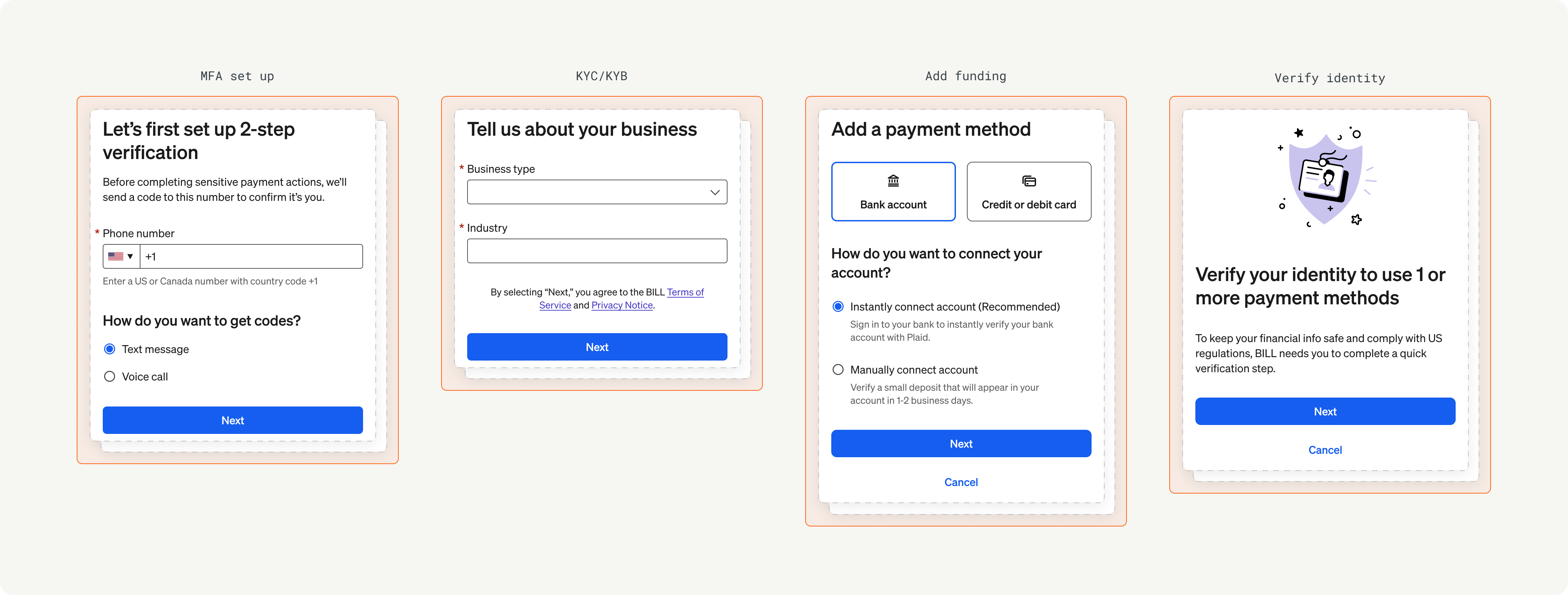
Onboarding Element
The BILL Content Delivery Network (CDN) service is equipped to provide the required assets for a high-performing Element experience in your solution.
Bootloader module
BILL provides a bootloader module that is set up for rendering and displaying BILL Elements on your web page with the specified CSS style and theme.
| Development environment | Bootloader module URL |
|---|---|
| Sandbox | https://widgets.stage.bdccdn.net/bootloader/index.js |
| Production | https://apps.bill.com/bootloader/index.js |
List of available BILL Elements
BILL provides Elements for a wide range of features and capabilities. As we add more capabilities, we will keep adding to this list.
| BILL Element | Description |
|---|---|
onboarding | Onboarding Element to complete BILL KYC/KYB checks for the organization, set up MFA, add funding payment methods for paying vendors and bills, and complete user verification (if required). |
mfa | MFA Element to set up MFA with a valid phone number, and to complete the MFA challenge when BILL requires an MFA-trusted user session for an operation. |
fundingAdd | Add funding Element to add funding payment methods in the organization. |
funding | Manage funding Element to add new funding payment methods and to edit existing funding method details in the organization. |
userVerification | User verification Element to undergo BILL risk verification. Users that are flagged by the BILL risk model are set as NOMINATED to complete user verification. |
vendorSetupApp | Vendor setup Element to create new vendors. In addition, users can connect an existing vendor record from their organization to a vendor in the BILL network. |
schedulePayment | Schedule payment Element to schedule a one-time payment to a vendor. In addition, users can add payment details, such as funding payment method, a note for their vendor, and a process date for today or for a date in the future. |
payments | Payments Element to view and manage the scheduled, in-flight, and historical payments made to vendors. In addition, users can filter payments by vendor and easily manage payments. |
vendors | Vendors Element to view a list of vendors. In addition, users can filter vendors, manage vendor details, and schedule payments. |
Next steps
In the next set of sections, we detail the different components of a BILL Elements integration and then showcase the events reference for each BILL Element.
| Section | Description |
|---|---|
| Elements integration guide | Overview of a BILL Elements integration with sample code |
| Elements reference | User experience and implementation details for working with each BILL Element |
| Elements advanced integration features | Implementation of a Content Security Policy (CSP) on your web page |
Updated 4 months ago