
AP payment disbursement methods
BILL supports multiple AP payment disbursement methods to deliver vendor payments. See BILL Pricing & plans to learn more about pricing for each disbursement method.
Check
Paper check is a BILL disbursement method. BILL prints and mails checks on your behalf. The check includes information (contact, account number, and invoice number) to help the vendor identify the payment.
Check benefits
Checks are written with a BILL account. This keeps your bank details private.
Checks expire after 90 days. BILL automatically voids expired checks, & funds are returned to the funding account.
Users with view payment permissions receive an email notification.
BILL simplifies reconciliation by making a single debit for all check payments processed in a single day.
You do not need to match individual check numbers.
Important notes about checks
| Note | Description |
|---|---|
| US private vendors | BILL issues paper checks only to US vendors. |
| Check Pay to | The check Pay to field has a limit of 60 characters. |
| Invoice number | BILL prints the invoice number in the check, stub, & confirmation email. The invoice number for a check payment has a limit 20 characters. If the invoice number exceeds 20 characters, BILL prints the last 20 characters. |
| Payment amount limit | Maximum check amount is $99,999,999.99. |
| Check tracking | BILL sends checks with USPS First Class mail & does not have tracking numbers. |
| Check image | You can get an image for an existing check sent to a vendor with the Get check image data API endpoint or Payments Element . The check image front & back is available when the vendor bank processes the check payment. |
ACH (ePayment)
ACH is a BILL disbursement method. You can pay both public (available in the BILL Network) and private (you maintain vendor bank account information) vendors with ACH.
Payment processing
On the payment process date, BILL debits funds from your funding account, & sends a payment notification email to the vendor. This notification includes remittance information & an estimated payment arrival date.
Payment delivery
BILL waits 2-3 US business days for debit settlement. When BILL receives your funds, BILL credits the vendor bank account.
ACH benefits
Average BILL ACH processing time is 2–5 days. AP payment acceleration options are available for same day ACH & next day ACH. See AP payment acceleration options for more information.
Flat fees for standard ACH transactions. BILL does not charge any additional percentage-based fees.
Important notes about ACH
| Note | Description |
|---|---|
| Private vendor bank verification | When you add a vendor bank account in the production environment, BILL requires 2 business days to complete a one-time verification of the bank account. If you pay a vendor during this verification period, the vendor may experience a payment delay of up to 2 days. |
Virtual card
Virtual card is a BILL disbursement method. Virtual card is a free, easy, and fast method to pay vendors. When a vendor accepts virtual card payments, BILL sends them a single-use, 16-digit Mastercard or Visa number for each payment amount. The vendor processes a virtual card just like a credit card.
Issue virtual card
BILL sends the virtual card with the vendor-specified delivery method. For example, email.
Vendor processes virtual card
The vendor processes the 16-digit number card with their merchant card processing system.
Virtual card expiration
Virtual cards expire after 20 days. An unprocessed virtual card is voided, & BILL reissues the payment as check or ACH. The choice is based on the earlier vendor preferred payment method.
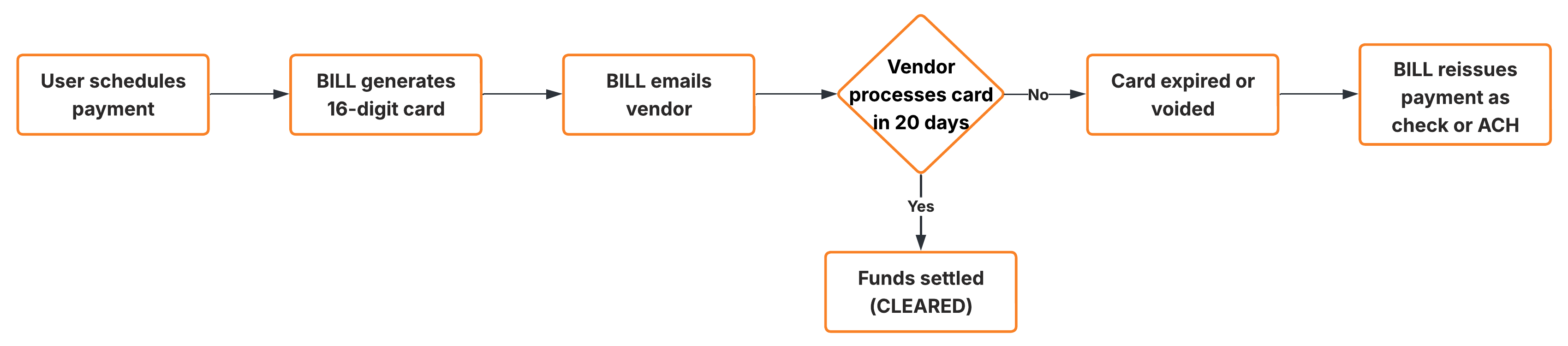
Virtual card payment workflow
Virtual card benefits
BILL disburses the payment on the current or next US business day.
BILL does not charge any fees for sending virtual cards to vendors.
BILL simplifies reconciliation with rich remittance information (invoice number & customer details).
Important notes about virtual cards
| Note | Description |
|---|---|
| Single use | BILL virtual cards are single use for the full payment amount. A vendor has the ability to process less than the full amount. The payment status is updated to reflect this case. The vendor has until the virtual card expiration date to process the card for the remaining amount. When the card expires, it is voided, & BILL returns any remaining amount to the payer funding method. |
| Vendor fees | BILL does not charge any fees for sending virtual cards to vendors. When the vendor processes the 16-digit number card, the vendor's merchant card processing system may charge card processing fees. These processing fees are not specific to BILL virtual cards. |
| Vendor enrollment | You have no actions for vendors enrolling to accept virtual card payments. The BILL Network is robust with virtual card vendors, & sends virtual cards to vendors that accept virtual cards. |
International payments
BILL supports international payments to 130+ countries in over 100 currencies. BILL is cost-effective as compared to banks for international payments. You can seamlessly integrate international payments in your AP payments workflows.
International payments configuration
When creating an international vendor, you set the vendor bill currency and payment currency.
BILL uses the bill currency to create bills for the vendor. For example, an international vendor in France may have bill currency set as USD or EUR. Payment currency states the currency in which the vendor accepts payments. The vendor in France may have payment currency set as USD or EUR.
| Bill currency | Payment currency | Foreign exchange details | Process date | Payment delivery method |
|---|---|---|---|---|
USD | USD | No conversion | Any US business day in the future | Wire |
USD | Foreign currency (Such as EUR) | Vendor pays for exchange rate when BILL processes the payment. BILL informs the vendor about the exchange rate when the payment is processed. | Any US business day in the future | Local transfer or Wire |
Foreign currency (Such as EUR) | Foreign currency (Such as EUR) | Payer pays for exchange rate when BILL processes the payment. | Must be the next US business day | Local transfer or Wire |
International payments delivery methods
BILL uses wire transfer and local transfer as the international payments delivery methods. Local transfer provides faster payment delivery, upfront exchange rates, fewer errors, & easier reconciliation.
| Feature | Wire transfer | Local transfer |
|---|---|---|
| Delivery method | BILL delivers wire transfers with the SWIFT network or through intermediary banks. | BILL delivers local transfers with the vendor country's domestic payment network. If available, BILL defaults to using local transfer. |
| Delivery timing | Delivery timing depends on the vendor country. | Payments can be delivered up to 4 days faster than wire transfers. |
| Payment currency | Payments can be made in USD and in the international currency. Wire transfers are available in more currencies as compared to local transfer. | Payments can be made only in the international currency. |
| Availability | No specific rules on availability. | Availability depends on vendor country & payment limit threshold. |
Important notes about international payments
| Note | Description |
|---|---|
| Available funding methods | You can fund international payments with your bank account, credit card, or debit card. Visa, Mastercard, and Discover are the only card options available. |
| BILL Network availability | The BILL Network extends to international vendors. Currently, BILL has Network support for many countries, & the list continues to grow. See Network-supported countries in the BILL Help Center for more information. |
AP payments timing
When you schedule a payment, the earliest process date you can set is the next US business day. When you set process date as a non-US business day, BILL automatically sets the process date as the next available US business day. You can set process date as a date in the future.
| Disbursement method | Time |
|---|---|
| ACH | 2 to 4 business days |
| Check | Up to 10 business days (Standard USPS First Class mail timing) |
| Virtual card | Delivery on the same day or next business day. When the vendor processes the card, they receive funds in 1 to 2 business days. |
| Wire transfer | 1 to 3 business days |
| Local transfer | 1 business day |
AP payments acceleration options
You can pay vendors with faster check and ACH payment options.
You select BILL Pay Faster for check & ACH payments. You pay an additional fee.
Vendor accepts the BILL Instant Transfer option to receive a payment. The vendor pays an additional fee.
Based on internal rules & specific payment details, BILL can choose to accelerate payments at no additional cost.
BILL accelerated payments are delivered in 2 business days.
| Pay Faster type | Delivery timing | Additional fees |
|---|---|---|
| ACH | Same day (Scheduled before 10 AM PT) | $11.99 |
| ACH | 1 US business day (Scheduled before 6 PM PT) | $11.99 |
| Check UPS 1-day | 1 US business day | $24.99 |
| Check UPS 2-days | 2 US business days | $19.99 |
| Check UPS 3-days | 3 US business days | $14.99 |
When an accelerated payment fails
When an accelerated payment fails due to Non-Sufficient Funds (NSF), BILL follows a set of steps.
Payment status change
Payment status changes to FUNDING_FAILED_ACTION_NEEDED.
Email notification
You receive an email from BILL outlining next steps for resolution.
When there is no resolution
If unresolved, BILL has 3 options: Attempt to debit funds again, reverse the payment, or disable money movement.
Cancel & void AP payments
When you create a payment, you can attempt to cancel or void the payment.
| Rule | Cancel payment | Void payment |
|---|---|---|
| When? | You can cancel a payment before BILL begins money movement. | You can void a payment after BILL begins money movement. |
| Payment status | The payment status must be SCHEDULED. | When BILL is processing the payment, but before the payment status is SENT (ACH) or DELIVERED (Check & virtual card). |
| Impact | BILL does not debit funds from your funding account. | BILL debits funds from your funding account. A credit to your funding account may take 2 to 5 US business days from the date of the void request. |
BILL rejects cancel & void requests based on the payment lifecycle.The BILL v3 API rejects cancel payment requests when the payment status is a stage after
SCHEDULED. The API rejects void payment requests when the payment status has reached theSENT(ACH) orDELIVERED(Check & virtual card) stage.
Updated 3 months ago