
Schedule payment: User experience
In this section, we showcase visuals and the primary user interactions with the Schedule payment Element.
See Schedule payment: Implementation for implementation details, including pre-conditions, custom events, and error handling.
Core behavior and requirements
With the Schedule payment Element, BILL has a set of requirements for the expected behavior.
| Behavior & requirements | Description |
|---|---|
| User role | The organization user must have the ADMINISTRATOR or PAYER user role to schedule a payment. |
| User verification | Before the user can use a funding payment method, the user may be required to undergo BILL risk verification. Users that are flagged by the BILL risk model are set as If user verification is required, the user is prompted to complete the verification process in the Schedule payment Element. User verification is also available with the User verification Element, Add funding Element, Manage funding Element, and Onboarding Element. Without verification, the user cannot use a funding payment method for payments. |
| Funding payment method | The user must have at least one verified funding account method added in their BILL organization to make a payment. |
| Vendor | The user must have at least one vendor record in their BILL organization to make a payment. Adding a new vendor record is available with the Vendor setup Element. See Vendor setup Element for more information. |
Plan your user experience
In this section, we outline key considerations for planning a seamless user experience when integrating with the Schedule payment Element into your application. Ensure that you address each point thoughtfully to realize the full value of the Element capabilities in your existing experience.
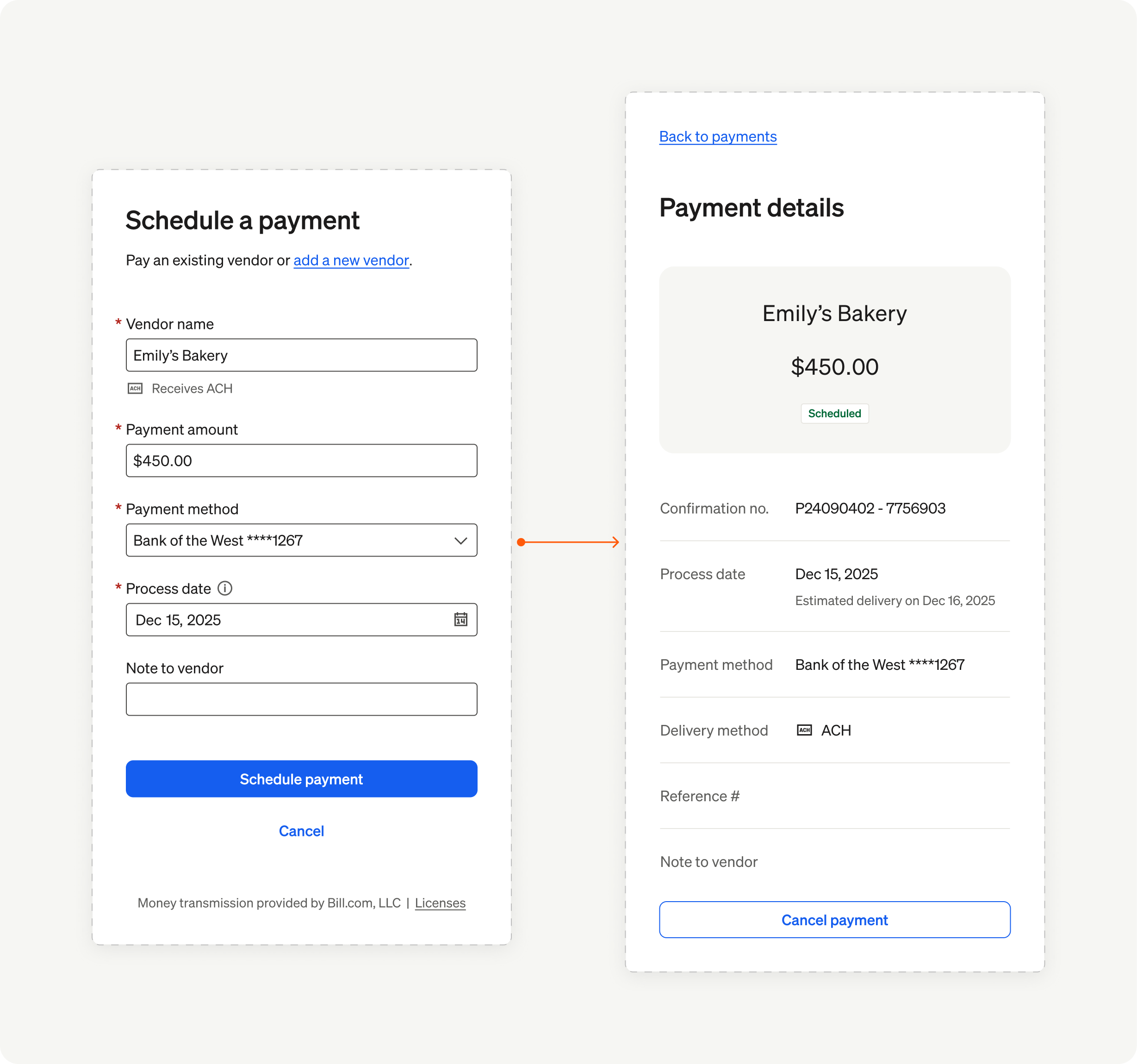
Element overview
Assumptions
When the user is using the Schedule payment Element, BILL makes a set of assumptions.
- The user session is MFA-trusted
- The user has undergone BILL risk verification and is verified
- The user wants to schedule a payment to a vendor
Entry points
There are a set of workflows where the Schedule payment Element can be integrated.
- When the user is attempting to pay a bill
- When the user is attempting to view details of their vendors
- When the user is attempting to schedule a payment to a vendor
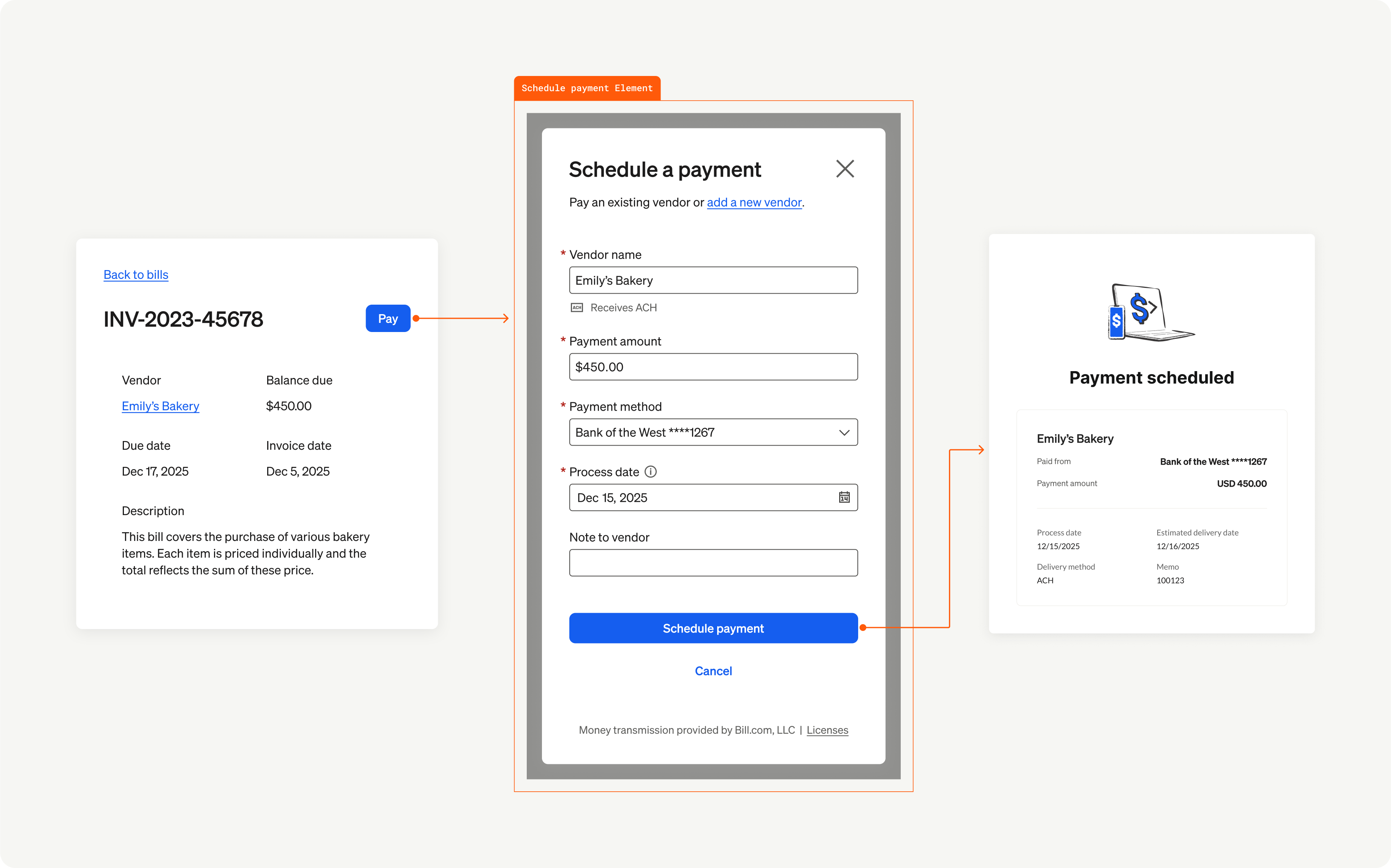
Element entry points
Map the user flow
Map the complete user flow from identifying the need to schedule a payment to successfully completing the process of scheduling the payment.
Maintain context
Ensure that your users understand that they are scheduling a payment to a vendor. On the payment process date, BILL will begin the process of transferring funds from the chosen funding account method to the vendor account. The payment disbursement method is based on the vendor’s set payment method - ACH, virtual card, or check.
Related Elements
BILL Elements are connected and understanding this connection and hierarchy enables you to understand the user experience better.
| Connection | Description |
|---|---|
| Parent | Onboarding Element: The user can complete BILL KYC/KYB checks for the organization, set up MFA, add funding payment methods for paying vendors and bills, and complete user verification (if required). MFA Element: MFA is required for the user to add a funding payment method. When the signed-in user session is not MFA-trusted, the user is required to complete the MFA setup. Add funding Element: The user can add funding payment methods in the organization. Manage funding Element: The user can add additional funding payment methods and manage existing funding method details in the organization. User verification Element: The user may be required to complete one-time BILL risk verification before the user can use a funding payment method for payments. Vendor setup Element: The user can create a new vendor record or connect an existing vendor record from their organization to a vendor in the BILL network or invite their vendor to the BILL Network. Vendors Element: The users can view a list of their vendors. In addition, users can filter vendors, manage vendor details, and schedule payments. Payments Element: The user can view and manage their scheduled, in-flight, and historical payments made to vendors. |
Updated 8 months ago
What’s Next
Now that you understand the user experience, the next step is to integrate the Schedule payment element. Continue to the Implementation section to learn about pre-conditions, custom events, and error handling.