
BILL Network
The BILL Network is a collection of vendor organizations and customer organizations using BILL. BILL automatically enables electronic payments between connected vendors and customers. In addition, connected vendors receive payments in their set payment method - ACH, virtual card, or even check.
Verified national vendors (Large billers) include water, power, cable, and phone companies and are part of the BILL verified national vendor network.
The BILL Network includes the verified national vendor network.
With over 7 million entities in the BILL Network, send fast, secure ePayments, simplify vendor onboarding, and automatically reconcile payments.
The result is saved time and reduction in manual work.
Vendor types
BILL has 2 types of vendors.
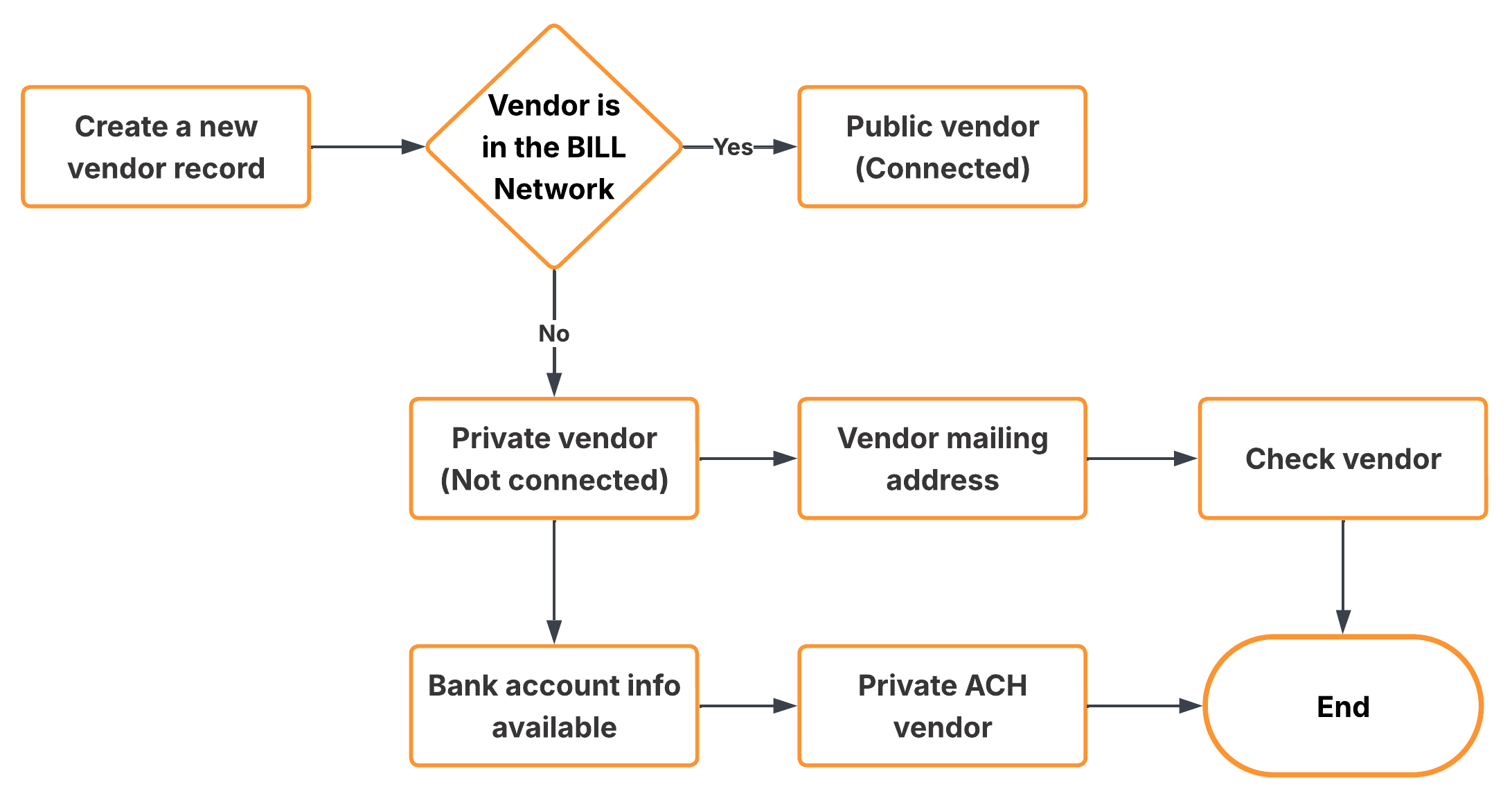
Vendor record workflow
Private vendors
A private vendor is a record not connected to the BILL Network. You manually manage the vendor details.
| Payment type | Description |
|---|---|
| Check vendor | Provide an address; BILL mails a paper check. |
| Private ACH vendor | Provide bank details; BILL sends electronic payments. |
| Virtual card | If a private vendor accepts virtual cards, BILL automatically updates the payment method to VIRTUAL CARD with the auto-enrollment process. See BILL terminology to learn more about the auto-enrollment process. |
Public vendors (or BILL Network vendors)
Public vendors are entities already established in the BILL Network.
| Vendor type | Description |
|---|---|
| BILL AR organization (Advanced Receivables) | These are organizations or individuals that subscribe to BILL directly or through a partner for the BILL Advanced Receivables account. These organizations must accept an invite before they are |
| BILL BR organization (Basic Receivables) | These are organizations that join the BILL Network for free with an invite from a BILL subscriber and create a Basic Receivables account to manage their payment information. These organizations are not required to accept an invite before they are |
| Verified national vendors (RPPS) | This directory includes large billers, such as national or regional telecommunications companies, utility companies, banks, and large retailers. These vendors always require an account number (and occasionally a zip code) to connect and pay. No acceptance is required for connection. Provided the account number and, if required, zip code pass validation, the payer connects for electronic payments. |
BILL Network connections
Connect in the Network
You can convert a private vendor to a public vendor in 3 ways.
| Method | Description |
|---|---|
| Auto-connect | BILL automatically matches private vendor details with vendors in the BILL Network. When BILL finds a confident match, BILL updates the vendor details to the public profile. |
| Manual search | Use the BILL v3 API or BILL Elements to search for the vendor in the BILL Network with information about the private vendor. If you find a match (RPPS, AR, or BR), you can connect manually. |
| Vendor invitation | Invite a private vendor to create a Basic Receivables (BR) account. When the vendor accepts the invite, they become a public vendor. |
Disconnect from the Network
If you connected with the incorrect vendor in the BILL Network or if you want to manage payment preferences manually, you can disconnect from the public vendor.
Prerequisites
Before you disconnect from a public vendor, ensure that no payments are currently processing or scheduled. You must wait for the payments to complete or void before you can disconnect from the public vendor.
In addition, confirm the vendor mailing address before disconnection to ensure that BILL delivers checks to the correct vendor address location.
BILL Network implementation guidelines
This section details how to build a vendor management experience based on vendor Network status.
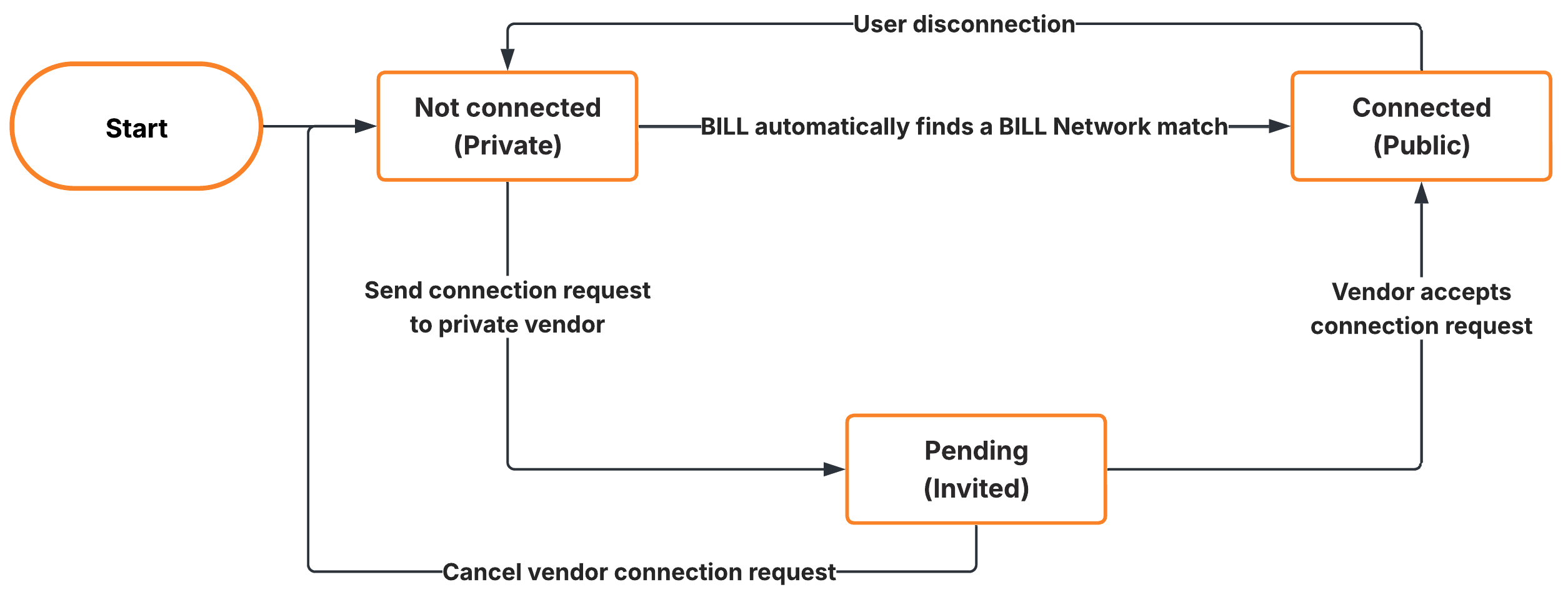
Vendor state lifecycle
| Status | Scenario | Vendor management in your system |
|---|---|---|
NOT CONNECTED | Private vendor | Enable users to edit vendor details, and ensure that you sync all updates with BILL. |
PENDING | The vendor is invited to connect in the BILL Network, but has not yet accepted. | Identity storage: Each time a vendor is created in a BILL organization, capture and store vendor data (with the BILL v3 API or BILL Elements). Enable editing: Enable users to edit vendor details, and ensure that you sync all updates with BILL. Manage invites
|
CONNECTED | Public vendor (or BILL Network vendor) | Identity storage: Each time a vendor is created in a BILL organization, capture and store vendor data (with the BILL v3 API or BILL Elements). Disable editing: Disable vendor detail updates. Display a Managed by BILL status to prevent data conflicts. Manage connections
|
Documentation resources
| Section | Description |
|---|---|
| Vendor setup | API: Create a vendor with POST /v3/vendorsElement: Vendor setup Element |
| Vendor management | API
|
| More details | Guides: BILL Network API: /v3/network |
Updated 3 months ago